Introduction
Online Web Presence isn’t easy and choosing the right SEO plugin for your WordPress site can be overwhelming. With dozens of options available, including free and paid versions, it’s easy to make the wrong choice that slows down your site or creates SEO issues.
This guide explains how to select the best SEO plugin for WordPress in 2026, highlighting practical evaluation criteria, common mistakes, and real-world examples. Whether you are a blogger, small business owner, or e-commerce manager, this article will help you make a confident decision that improves rankings, performance, and user experience.
“If you’re new to SEO plugins, check out our comprehensive beginner guide here.”
– Why Choosing the Right SEO Plugin Matters
Not all SEO plugins are created equal. The right plugin helps you:
- Optimize on-page content effectively
- Automate repetitive tasks without technical expertise
- Maintain a consistent SEO structure across your website
- Improve crawlability and indexation
Conversely, the wrong plugin—or using multiple overlapping SEO plugins—can:
- Slow down your site
- Cause conflicts between features
- Generate duplicate or missing meta tags
“Explore our detailed review of Rank Math PRO and other top SEO plugins here.”
– The 7 Key Criteria to Evaluate an SEO Plugin
Choosing the best plugin requires evaluating each option across seven essential criteria.
– Ease of Use for Beginners
- Intuitive interface
- Guided setup wizards
- Clear suggestions for meta titles, descriptions, and schema
– On-Page SEO Features
- Edit titles, meta descriptions, headings
- Control indexing settings
- Content analysis and optimization tips
– Schema Markup & Rich Results
- Supports Article, Breadcrumb, Product, and Organization schema
- Automates structured data to increase visibility in rich snippets
– Performance & Speed
- Lightweight and modular code
- Avoids conflicts that slow down the site
– Automation vs Control
- Automates repetitive SEO tasks
- Allows manual overrides when needed
– WordPress Integration
- Works with themes, page builders, and other plugins seamlessly
– Pricing & Scalability
- Free version: basic optimization
- Paid version: advanced features for growing websites
“Compare these features in our full Rank Math PRO review.”
– Free vs Paid SEO Plugins: What You Need to Know
Free Search Engine Optimization plugins are sufficient for small blogs and beginners. However, advanced websites benefit from paid features, including:
- Advanced automation and recommendations
- Built-in schema support
- Keyword tracking and insights
- Priority support
For growing businesses, paid versions provide long-term efficiency and better scalability.
– Common SEO Plugin Mistakes to Avoid
Even the best plugin won’t save you from misconfigurations. Common mistakes include:
- Installing multiple SEO plugins at once
- Enabling every feature without understanding it
- Ignoring schema and indexation settings
- Using duplicate meta titles across pages
Avoiding these errors ensures that your plugin works effectively and your site’s SEO stays consistent.
According to SEO experts at Moz, installing multiple SEO plugins or misconfiguring features can negatively impact search performance.
– Rank Math vs Other SEO Plugins
Rank Math PRO
- Automation of on-page SEO
- Built-in schema for rich results
- User-friendly interface for beginners
Yoast SEO
- Popular, well-documented
- Many free features
- Premium version required for full automation
All-in-One SEO
- Easy setup
- Basic features in free version
- Less intuitive interface for beginners
→“Read our full comparison chart of Rank Math, Yoast, and All-in-One SEO here.”
→“See detailed Rank Math PRO review here.”
– Which SEO Plugin Fits Your Situation?
Bloggers
- Focus on readability, meta optimization, and content guidance
Small Businesses
- Simple setup, automation, and scalability
E-commerce Websites
- Product schema, WooCommerce integration, performance
Agencies
- Multi-site management, advanced automation, reporting
– How to Set Up Your SEO Plugin Correctly
Proper setup ensures optimal performance:
- Configure titles and meta templates
- Enable necessary schema types
- Connect analytics tools
- Review indexation and canonical settings
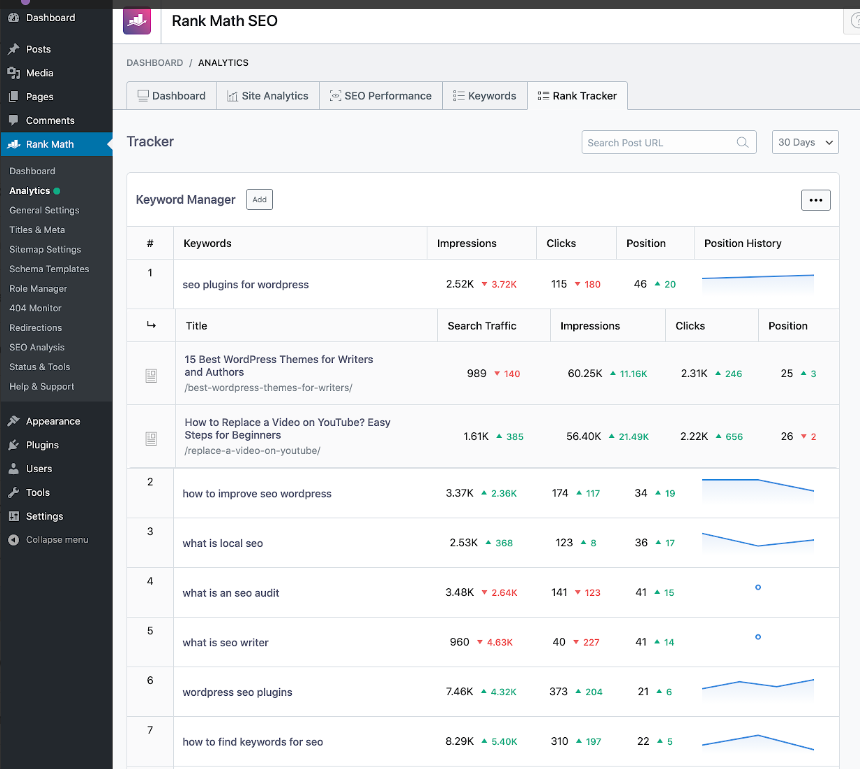
Avoid over-customization at first. Start simple and expand settings as you gain experience.
Rank Math PRO stands out as a central AI-powered SEO system for WordPress users. It combines advanced automation with ease of use, making professional-level SEO accessible even to non-technical users.
Key AI-driven capabilities include:
- Intelligent on-page optimization suggestions
- Automated schema markup
- SEO scoring and content analysis
- Smart internal linking recommendations
- Technical SEO automation without manual coding
- By consolidating multiple SEO functions into a single platform, Rank Math PRO reduces plugin overload while improving overall site performance.
- “Follow our step-by-step setup guide in Article #3.”
Conclusion
To choose the best SEO plugin for WordPress, it requires balancing usability, automation, and scalability. Consider your site’s goals, growth potential, and technical knowledge.
By selecting the right plugin and setting it up correctly, you lay a strong SEO foundation, improve rankings, and attract more traffic.
For a detailed breakdown of features and pricing, read our complete Rank Math PRO review.
1 thought on “How to Choose the Best SEO Plugin for WordPress [2026 Buyer’s Guide]”