Rank Math PRO Review: The Ultimate WordPress SEO Suite
Rank Math PRO is a leading WordPress SEO plugin that positions itself as an all‑in‑one solution, often cited as a top alternative to Yoast SEO and other popular plugins. It builds on a powerful free version (with 3+ million installs) by adding advanced tools like keyword rank tracking, A/B testing, and AI‑powered content guidance. Backed by MyThemeShop, Rank Math has quickly gained popularity among bloggers, agencies, and developers looking for a comprehensive SEO toolkit. In fact, TechRadar notes that “Rank Math…offers a robust suite of features aimed at improving website visibility and performance”. With built‑in support for rich snippets, Google Analytics/Search Console integration, and an industry‑leading modular interface, Rank Math aims to help site owners “stop the guesswork” and get higher rankings without juggling multiple plugins.
Before diving in, note that we regularly publish in‑depth reviews and head‑to‑head comparisons of SEO tools on our site (see our SEO tools reviews and Comparisons pages). This review of Rank Math PRO will walk through its history, core features (Schema, automation, content AI, analytics, technical SEO, etc.), and how it compares to competitors. We’ll also cover pricing, pros/cons, real‑world use cases, success stories, a 30‑day implementation roadmap, and the overall ROI you can expect. Let’s get started.
History & Background
Rank Math was launched in 2018 and quickly gained traction. Developed by the team behind MyThemeShop, it aimed from the start to be a feature-packed alternative to established plugins. According to one analysis, “Rank Math was founded in 2018 and gained traction incredibly quickly, having almost as many active users as some of the other SEO plugins on this list in just a few years”. In practical terms, its WordPress.org listing now reports over 3 million active users and a 4.9/5 rating, a testament to its rapid rise.
Rank Math’s founders designed it as a “Swiss Army Knife of SEO” for WordPress. The plugin offers 15+ optional modules (for things like Search Console, Schema, WooCommerce SEO, etc.) that you can enable as needed. It has an intuitive setup wizard that automatically configures many SEO defaults (crawling, sitemaps, social profiles) on first install. Over time, it has added cutting‑edge features like content‑writing AI (more on this below) and deep analytics integration. Today, Rank Math is praised for combining “the power of many SEO and AI tools in a single package”.
As TechRadar notes, Rank Math “remains a compelling choice for those serious about elevating their SEO game” thanks to its breadth of tools. Its all‑in‑one approach means you can replace multiple plugins (schema, redirection, multiple keyword optimizers, etc.) with one lightweight solution. In practice, SEO professionals and agencies have taken notice: leading SEOs like Matthew Woodward (who runs a popular SEO blog) switched from Yoast after praising Rank Math’s free features. User testimonials echo this sentiment. One user calls Rank Math “by far the best WordPress SEO plugin ever created”, while another highlights its clean, uncluttered UI despite “many options”.
For context, Rank Math now claims some 3+ million installs and over 7,350 five‑star reviews on WordPress.org. In the marketplace, it competes closely with Yoast SEO (10+ million installs), All in One SEO (AIOSEO), SEOPress, and others. But its free tier already includes many features that others reserve for paid plans (multiple focus keywords, integrated rich snippets, etc.). We’ll see how that plays out below.
Key Features & Tools
– Rank Math PRO Review: Key Features
Rank Math PRO is loaded with features that cover just about every aspect of on‑page and technical SEO. Below are the core tools and what they do:
- Easy Setup Wizard & Default Settings: Rank Math’s guided setup wizard configures your site’s SEO in minutes. It automatically detects site type, webmasters (Google, Bing verification), social profiles, and SEO defaults. The result is a fully‑optimized baseline, so you can focus on content rather than tedious config.
- On‑page Content Analysis: As you write or edit posts, Rank Math scores your content in real-time, giving actionable suggestions for keywords, readability, title length, meta tags, and more. The built-in content analyzer checks against up to unlimited focus keywords (5 by default, unlike Yoast’s 1 keyword). It also integrates an LSI keyword tool to suggest related terms. In short, you get a comprehensive SEO checklist next to the editor.
- Advanced Schema Markup (Rich Snippets): One of Rank Math’s standout features is its schema generator. It supports 20+ schema types (FAQ, HowTo, Recipe, Video, etc.) out of the box. A point-and-click interface lets you add structured data without coding. You can even import schema from other pages or websites to duplicate rich snippets[18]. By adding rich markup, you make your content more likely to earn Google’s rich results (like FAQ accordions), which can improve CTR. According to Rank Math’s docs, Schema support is one of its core strengths. (Example: This review itself could use a “Product” or “Review” schema via Rank Math.)
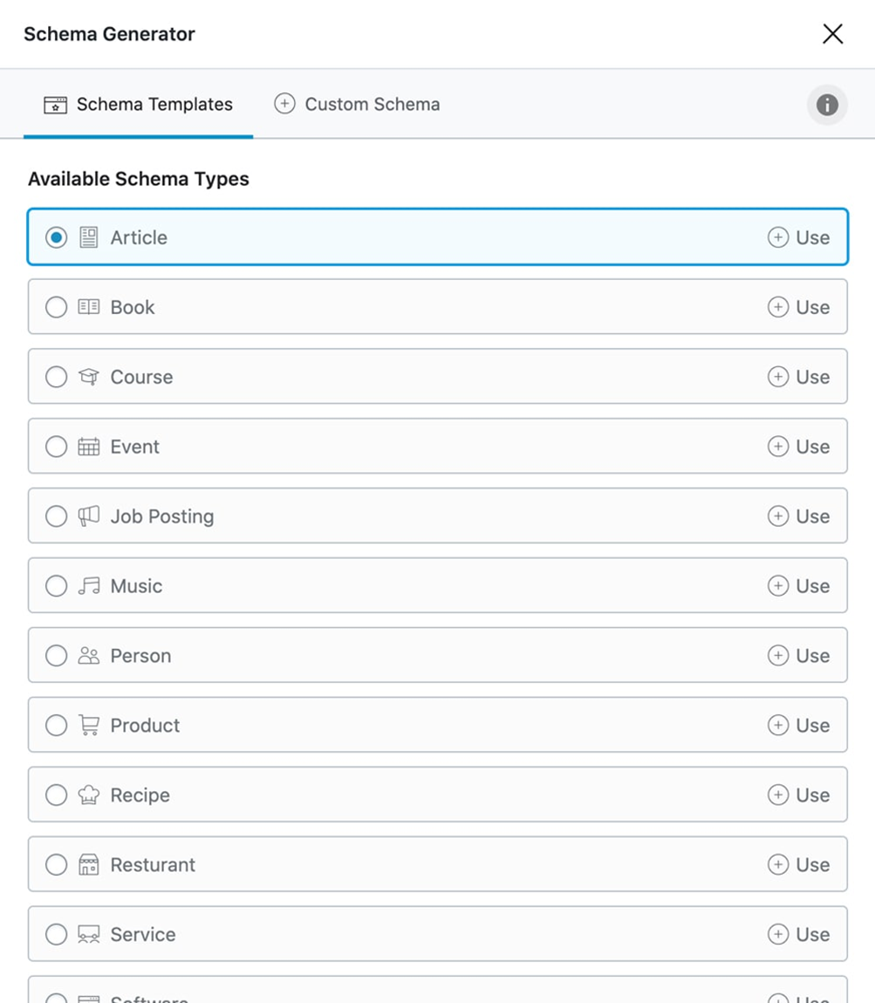
Screenshot: Rank Math’s Advanced Schema generator (built into the editor) simplifies adding structured data types to your posts.
- Content AI Assistant: Rank Math includes a built-in AI writing assistant (powered by a proprietary engine) that suggests keywords, questions, and topics as you write. Think of it as an SEO‑focused version of ChatGPT. It recommends focus keywords and related terms to improve optimization. You can also generate SEO‑friendly content outlines with a one‑click prompt. This is unique — TechRadar calls it a “game-changer” for crafting optimized content. (Note: Content AI usage is limited by credits, which PRO plans include more of.)
- Google Analytics & Search Console Integration: Rank Math pulls real data from Google into your dashboard. It connects with Google Analytics 4 and Google Search Console so you can view traffic stats, keyword rankings, CTR, impressions, and errors without leaving WordPress. For example, Rank Math shows your site’s top keywords and index coverage under its Analytics module. You even get a built‑in rank tracker: specify keywords and the plugin will chart your position and historic performance. This makes monitoring SEO results easy and immediate.
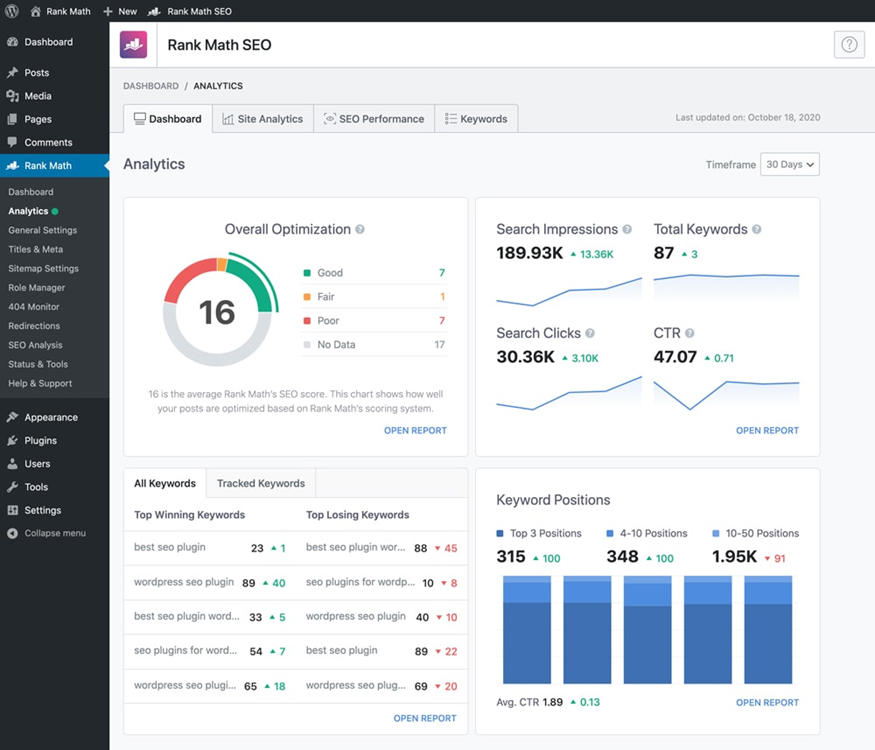
Screenshot: Rank Math’s Analytics Dashboard integrates Google data (Search Console, GA4), showing clicks, impressions, CTR, and keyword performance directly in WordPress
- Advanced Technical SEO Tools: Beyond content, Rank Math handles many technical tasks:
- XML Sitemaps: Auto-generates optimized sitemaps (including video/image/News sitemaps) and pings search engines on new posts.
- Redirect Manager & 404 Monitor: Track broken links and easily set up 301/302 redirects without another plugin. (Unlike AIOSEO, redirection is free in Rank Math).
- Robots.txt Editor & llms.txt: PRO plans include built-in editors to tweak robots.txt and the new llms.txt (for AI search bots) with validation tools.
- Schema Automation: Create templates or set default schema categories for consistent markup across posts.
- Local SEO & WooCommerce: Dedicated modules for Local Business schema (with multi-location support in PRO) and WooCommerce SEO (product titles, alt tags, rich cards).
- Modular System: You can disable any module you don’t need (e.g. if you don’t use WooCommerce), keeping the code lightweight. Rank Math touts its small footprint – it’s about half the size and memory usage of Yoast.
- Performance and Security: Rank Math is built with performance in mind. Its codebase is lean (about 61K lines vs. Yoast’s 97K), so it adds minimal page load time. The plugin undergoes frequent code reviews for security and efficiency. And the user interface is designed to surface only the info you need, preventing overload.
Together, these features make Rank Math an all‑inclusive SEO solution. As the WordPress plugin description notes, it brings “intelligent features that were previously out of reach” to any site owner. And in practice, it means you often don’t need separate plugins for schema, analytics, redirects, or even content suggestions.
Why Rank Math Stands Out (vs. Yoast, AIOSEO, etc.)
Rank Math differentiates itself in several ways:
- More features in free version: Unlike Yoast or AIOSEO, many of Rank Math’s advanced tools are free. For example, Rank Math free lets you optimize multiple keywords per post and includes rich snippets support, whereas Yoast free only handles one keyword and no schema. It also offers redirects, advanced schema types (FAQ, HowTo), and an SEO analyzer without requiring a purchase. In head‑to‑head comparisons, Rank Math “wins for schema markup” since even the free tier includes FAQ/HowTo types.
- Performance: As noted above, Rank Math’s code is more lightweight. Independent tests show it adds only +0.01s load time (versus +0.18s for Yoast). This efficiency matters for speed-conscious sites. It also means you can enable dozens of features without bloating your site, whereas using Yoast’s multiple extensions (Local SEO, News SEO, etc.) would multiply plugin overhead[27].
- Built-in Analytics & Tracking: Few SEO plugins integrate so deeply with Google’s tools. Rank Math’s Analytics module is unique in showing Search Console data and organic keyword ranks inside WordPress. You don’t need to switch to external dashboards – you get clicks, impressions, and index status at a glance. Similarly, the Rank Tracker is more powerful than the simple keyword focus tools in other plugins.
- Content AI Assistant: This feature is essentially unique. None of the main competitors (Yoast, AIOSEO, SEOPress) offer an AI‑powered writing assistant integrated into the plugin. This gives Rank Math an edge for content teams who want guided suggestions as they write.
- Pricing Value: Rank Math’s premium plans are all‑inclusive (one price covers unlimited personal sites, and client sites depending on plan). BlogVault’s comparison highlights that even the free Rank Math often outperforms paid tiers of rivals – e.g. AIOSEO’s free plan lacks things like schema and redirects, whereas Rank Math free has them. And when you do upgrade, Rank Math PRO (billed ~$7–9/mo annually) tends to be cheaper for equivalent features than competitors.
- Intuitive UI: Many users praise Rank Math’s interface. The analysis panel shows SEO score, snippet preview, and suggestions all in one sidebar. A WPMarmite reviewer notes the interface is “clean… and there is no overload despite the many options”. TechRadar also praises the “intuitive user interface” that makes navigation easy.
Of course, every plugin has tradeoffs. Some still prefer Yoast for its decades‑long track record or AIOSEO for its beginner‑friendly wizards. But Rank Math’s combination of features, performance, and value often tips the scales. As one expert notes, if you have a solid grasp of SEO, “Rank Math is seriously THE BEST SEO plugin that I ever installed and tried out”.

Detailed Breakdown of Core Features
Below we take a closer look at Rank Math’s core modules and how you might use them:
- Setup Wizard & Core Settings: On installation, Rank Math launches a step‑by‑step wizard to configure your site. It sets up global SEO defaults (e.g. permalinks, noindex archives, webmaster verification codes, social profiles) automatically. Real‑world use case: On a new blog, you could have ideal SEO settings done in minutes – e.g. choosing single post titles like “%%title%% | %%sitename%%”, auto‑generating XML sitemaps, and linking your Google Analytics. This saves hours vs manual setup. (And you can rerun the wizard or use Custom Setup Mode if you want a do‑over.)
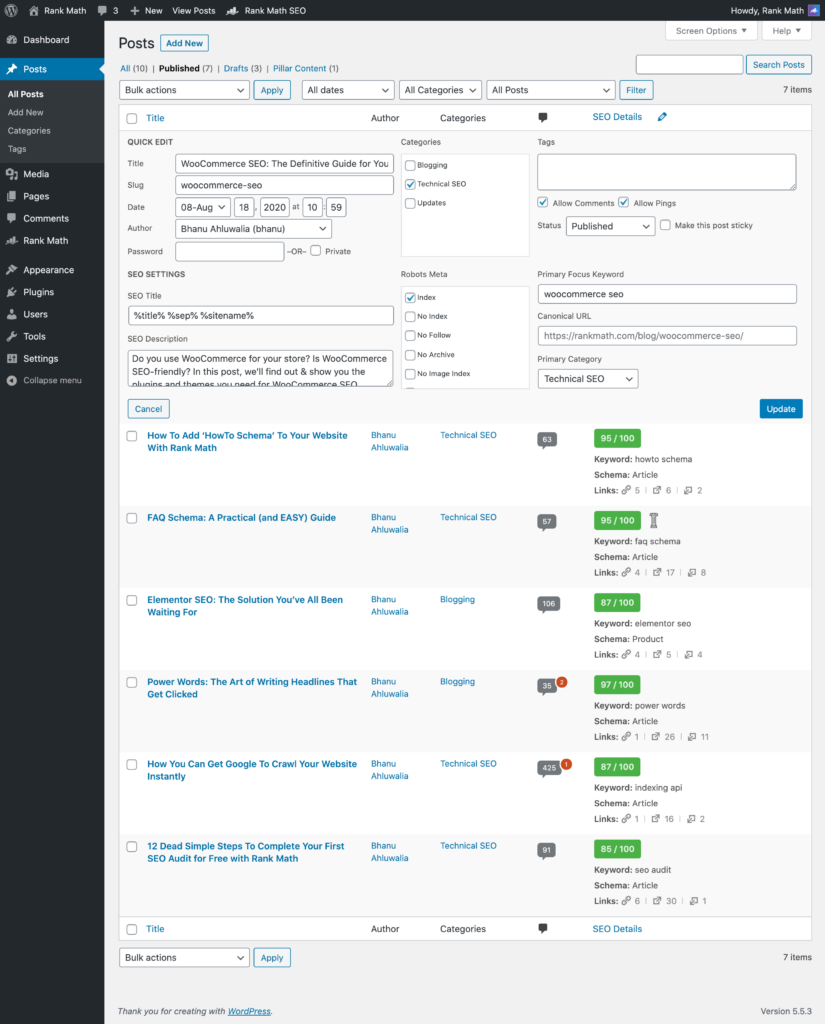
- On‑Page Optimization (SEO Analysis): Each post/page has an SEO score and suggestions box. Rank Math checks your content for meta tags, focus keywords, content length, title readability, and more. It provides a checklist (green/yellow/red lights) and tips to improve. You can input unlimited focus keywords (not just one), giving you flexibility to target several related terms in one post. In practice, bloggers will use this feature while drafting: writing a draft, adding a primary keyword, and letting Rank Math suggest synonyms or LSI keywords. This ensures each article is optimized for SEO best practices on the fly.
- Schema (Rich Snippets) Builder: Rank Math’s schema module is very robust. From the editor, you can click to add schema type (Article, Recipe, FAQ, etc.), fill in the fields, and preview how the structured data will look. There’s also an Advanced Schema Builder in PRO that lets developers create completely custom JSON‑LD. For example, an eCommerce site can automatically add Product schema (price, availability) to items, or a blogger can add HowTo steps. The plugin supports 20+ types by default, and PRO unlocks even more. Users report this feature as a major traffic driver – one SEO consultant saw organic orders double by switching from Yoast to Rank Math’s schema generator (FAQ schema made listings stand out).
- Content AI Suggestions: When writing a post, Rank Math can suggest additional keywords, common questions (FAQ), and semantic words to include. This leverages AI to mimic what top-ranking pages do. In practice, a writer might run the Content AI for a keyword and get a list of terms they hadn’t thought of, guiding them to cover those in the text. For example, writing about “digital marketing”, the AI might suggest “conversion rate” or “SEO audit”. TechRadar notes this helps you “know exactly what to write” to improve your content. The feature is valuable in brainstorming content outlines and ensuring comprehensive coverage of a topic.
- Google Search Console Integration: Rank Math pulls your GSC data into WordPress. The “Search Console” tab shows your latest crawl errors, index status, and search queries. A real‑world use case: you notice a drop in clicks on a post from the Search Console report, so you edit the post’s keywords or headline. All this happens within WordPress – no need to open Google’s dashboard separately. You can also request indexing of new/updated pages via the integrated Google Indexing API tool, speeding up how quickly Google re-crawls your site.
- Rank Tracker & Analytics Dashboard: Under the PRO plans, Rank Math includes a Rank Tracker where you enter target keywords (for Google, Bing, etc.) and see how your site’s pages rank over time. The results appear in a graph and table on your dashboard. For example, you could track 50 keywords for your main site; Rank Math will periodically update their positions and show “winning/losing” keywords. Meanwhile, the Analytics widget (with GA4 connected) can display sessions, bounce rate, and other metrics. This transforms WordPress into a mini-SEO console. In practice, a site owner might check weekly: “Which keywords moved up? Which pages need tweaking?” – all without logging into Google Analytics or Search Console.
- Technical Tools (Sitemaps, Robots, Redirects): Rank Math automatically builds and updates XML sitemaps (with advanced filters if needed). Its robots.txt and llms.txt editors are handy for developers who want to customize crawling rules. The built‑in redirection manager lets you set 301, 302, or 307 redirects easily (bulk import via CSV is also possible in PRO). For example, if you delete or merge a page, you can quickly point its URL to a new one and track any 404s. This means keeping a large site clean and Google‑friendly is straightforward. On the technical side, Rank Math also runs 30+ automated SEO tests in its SEO Analyzer tool to flag issues like missing meta tags or slow pages.
- Local SEO, WooCommerce, etc.: Rank Math has modules for Local SEO (Business schema with hours and map) and WooCommerce SEO (Product title rewrites, variation support, etc.). These are separate modules you can enable. For multi-location businesses, PRO offers a “Local SEO PRO” module that lets you manage multiple addresses and schemas easily. Similarly, WooCommerce sites can auto-add rich product markup. This breadth means Rank Math can serve niche needs out of the box, from podcast schema to LearnDash courses.
- Interface & Snippet Preview: Throughout the editor (Gutenberg or Classic), Rank Math shows a colorful box with your SEO score, title/description previews for Google and Facebook/Twitter, and suggestions for improvement. You can test title tags and meta descriptions on the fly. The interface is generally clean and doesn’t bloat the editor. In fact, users report that “the user interface is clean, everything is in order”, making it easy to see what’s affecting your SEO.
- Support & Updates: Active support and frequent updates are part of the package. The company provides a knowledge base, ticket support, and a community forum. (Premium plans get priority support.) While there’s no live chat currently – a point noted by TechRadar – response times are generally fast according to users. Updates are released regularly to keep up with Google’s evolving SEO requirements.
In summary, Rank Math PRO’s toolkit covers just about every SEO need: on-page optimization, technical SEO, analytics, and even AI‑driven content help. Whether you’re a novice or an expert, these tools can streamline your workflow and surface insights that save time.
Pros and Cons
Pros:
– Feature-Rich (Free+PRO): Even the free version includes many advanced features (multiple keywords, rich snippets, redirections) that others hide behind paywalls. Upgrading to PRO adds professional tools (rank tracking, automation) at a competitive price.
– Powerful Schema and Analytics: Unmatched schema support (20+ types) and deep Google integration (Search Console + GA4) make it easier to get rich results and monitor SEO performance.
– Intuitive Interface: The setup wizard and in-editor UI are straightforward for most users. The plugin highlights exactly what needs improvement as you write. TechRadar praises its “intuitive user interface” and clean design.
– Performance: Rank Math’s lightweight code means minimal site slowdown. Tests show it uses far less memory and adds virtually no load time compared to other SEO plugins.
– Content AI Assistant: The built-in writing assistant is unique and can accelerate content creation by suggesting keywords and topics, boosting your SEO with less effort.
Cons:
– Learning Curve: Given its many features, Rank Math can be overwhelming at first. New users might find the interface and settings complex until they familiarize themselves. (TechRadar notes some beginners could feel “overwhelmed” initially.)
– Support Limitations: Live chat support isn’t available yet, so free users rely on docs and forums. (TechRadar cites “limited customer support options, no live chat” as a downside.)
– Some Features Are PRO-only: Advanced tools like the rank tracker, schema automation, and client management are only in paid plans. If you absolutely need those, you must upgrade (though the free version remains very capable).
– Premium Cost (Optional): While priced well, the PRO plan’s renewal ($8.99/mo) may seem high to hobbyists, especially if some needed features are split between plans (Business/Agency).
Overall, many users feel the pros greatly outweigh the cons. For example, one reviewer states: “I was a Yoast premium user, and I was surprised to see how many free features Rank Math offers… I highly recommend the Rank Math SEO plugin.”. In short, for most WordPress site owners – from bloggers to small agencies – Rank Math’s benefits justify adopting it as a primary SEO plugin.
Pricing Plans
Rank Math PRO comes in several tiers to fit different needs. Each plan is billed annually (ex. VAT) and includes a 30‑day money-back guarantee. Here’s a summary:
- Free: Use on unlimited personal sites you own. Includes many core features (SEO analyzer, schema, social SEO, sitemap, basic local SEO, limited keyword tracking, etc.) at no cost. (The free version alone provides “tons of helpful features” according to our sources.)
- PRO (Personal) – $7.99/month (~$95.88/year): Ideal for bloggers and small businesses. Supports unlimited personal websites. Key PRO features include:
- Track rankings for up to 500 keywords.
- Content AI Credits (5k) for the AI assistant
- Advanced schema controls (custom schema, automation)
- Local SEO Pro (multiple locations)
- WooCommerce SEO Pro (product SEO)
- Speakable Schema, News/Video sitemaps, Google Trends integration
- 24/7 premium support
- Renews at $8.99/month.
- Business – $24.99/month (~$299.88/year): Targeted at freelancers, agencies, and businesses. Covers 100 client websites. Everything in PRO, plus:
- Track up to 10,000 keywords
- White-label email reports
- Client site management tools
- Unlimited data retention (e.g. Google data)
- Renews at $27.99/month. (this plan is “perfect for larger teams”.)
- Agency – $54.99/month (~$659.88/year): For high-volume agencies. Covers 500 client websites. Includes Business features, plus:
- Track up to 50,000 keywords
- Bulk site management for many clients
- 24/7 priority support (fastest response)
- Renews at $64.99/month.
- Rank Math + WP Rocket Bundle – $11.99/month: This plan bundles Rank Math PRO (on unlimited personal sites) with a license for one site of WP Rocket (a popular speed optimization plugin). It includes all PRO features plus performance enhancements (caching, file optimization). Great for those wanting both SEO and speed in one bundle.
All paid plans come with 30-day money-back guarantee. In short, Rank Math’s pricing is competitive, especially for multi-site use. Even the base PRO plan delivers extensive features, and going to Business/Agency unlocks serious tracking power. (For the latest pricing and any promotions, see the official pricing page.)
As a WordPress.org plugin, Rank Math SEO also emphasizes its affordability: the Renewal costs (PRO ~$107.88/yr, Business ~$335.88/yr) remain far lower than the sum of equivalent SEO tools you’d need from other vendors. Remember, you can upgrade or cancel at any time without penalty.
Who Should Use Rank Math PRO?
“Rank Math PRO is versatile” enough for many user types. It’s particularly well-suited to:
- Bloggers, Marketers & Small Businesses: Anyone publishing regular content who wants SEO guidance. The free version alone helps these users climb search rankings, and PRO adds more depth (keyword tracking, API integrations). Solopreneurs and SMBs often find Rank Math covers all their needs without hiring an SEO developer.
- Content Teams & Writers: With Content AI and detailed analysis, teams can streamline content production. Writers gain keyword suggestions and snippet previews, while editors can track post performance. Agencies producing client blogs will appreciate the efficiency.
- Agencies & Freelancers: The Business/Agency plans support multiple client sites and have white-labeled reports. An agency managing dozens of sites can see all their projects’ SEO scores and keyword ranks from one dashboard. Multi-location local SEO tools are perfect for agencies handling franchise or chain businesses.
- eCommerce Stores: WooCommerce shops benefit from built-in Product schema, bulk social meta settings, and Google Shopping SEO options. PRO plan’s bulk editor is handy for stores with large catalogs.
- Technical SEOs: Users who want control can use Rank Math’s advanced modules (robots.txt editor, custom schema builder, content analysis tests). Its 30+ SEO checks help identify hidden issues. Experienced SEOs can extend it via hooks and custom filters.
- Users Migrating from Other Plugins: Rank Math includes an importer for Yoast, AIOSEO, and other plugins. If you’re switching, you can bring over titles, meta, redirects, etc. This makes transitioning relatively painless. (We’ve seen many Yoast users switch to Rank Math and report immediate SEO gains.)
In short, Rank Math PRO is for any WordPress user serious about SEO. Its broad toolset means it can serve personal bloggers (SEO fundamentals explained here) and enterprise sites alike. If you find yourself juggling multiple SEO plugins or outsourcing SEO tasks, Rank Math PRO can centralize those functions.
Rank Math vs. Top Alternatives
Let’s compare Rank Math PRO to the other leading SEO plugins:
- Rank Math vs Yoast SEO: Yoast has a simpler interface and a massive user base, but Rank Math often wins on features. Rank Math’s free version includes multi-keyword optimization, redirect manager, and rich snippets (Yoast Free does not). Performance-wise, Rank Math’s code is much leaner. In side‑by‑side tests, Rank Math outstrips Yoast on customization and advanced options, though Yoast’s premium support and familiarity keep it popular. In short, switch if you want more built-in tools and speed.
- Rank Math vs All in One SEO (AIOSEO): Both are all-in-one suites, but they take different approaches. BlogVault’s review finds that “Rank Math delivers better value overall. The free version alone outperforms AIOSEO’s paid plans” In practice, Rank Math includes features (schema, redirects, local SEO) for free that AIOSEO locks behind paid tiers. If you prioritize advanced schema and granular control without monthly fees, Rank Math is superior. AIOSEO may have a slightly more beginner‑friendly interface for its premium features, but at a higher cost. (Verdict: Rank Math has the edge on value and features.)
- Rank Math vs SEOPress: SEOPress is another powerful plugin (especially in France) with features like built‑in analytics, local SEO, and minimal branding. Functionally, SEOPress and Rank Math offer very similar toolsets (sitemaps, schema, WooCommerce SEO, etc.). The choice often comes down to interface preference and support. Rank Math’s built‑in AI content assistant is a differentiator, and Rank Math’s pricing is all‑inclusive (one license covers unlimited sites you own). SEOPress is slightly more “barebones” by default, but also lightweight. Both earn high user ratings. If you want an exceptionally polished UI with extras like Content AI and don’t mind a slightly larger learning curve, Rank Math wins. If you prefer a minimal UI and built‑in analytics (SEOPress ties into GA4, Matomo), then SEOPress is a strong contender.
Below is a simplified comparison table:
| Feature / Plugin | Rank Math PRO | Yoast SEO Premium | AIOSEO | SEOPress Pro |
| Content AI Writing Tool | Yes | No | No | No |
| Multiple Focus Keywords | Unlimited (default 5) | 1 (premium allows more) | 1 (free) | 1 (free) |
| Schema Types (Rich Snippets) | 20+ built-in, full editor | Basic schema, lots paid | Many built-in, paid pro | Many built-in (incl FAQ) |
| Google Analytics Integration | Built-in GA4, rank tracker | Requires plugin or code | GA4, enhanced eCommerce | GA4, gtM integration |
| Google Search Console | Integrated analytics tab | Manual setup | Integrated (via Site Kit) | Integrated (via GA) |
| Redirect Manager | Included (free + pro) | Premium only | Premium only | Included (free & pro) |
| Local SEO (Multi-location) | PRO: unlimited locations | Plugin/add-on (premium) | Plugin (premium module) | Included (pro) |
| Keyword Rank Tracking | Built-in (5–50k keywords) | No (outsourced) | Yes (limited) | No (3rd-party needed) |
| UI & Setup Wizard | Clean, modular, wizard | Simplified wizard | Wizard + linear UI | Straightforward UI |
| Performance Impact | Very low (small codebase) | Moderate | Moderate | Very low |
| Pricing (single-site plan) | ~$95/yr (PRO) | ~$89/yr (Yoast SEO Premium) | ~$49–199/yr (tiers) | ~$69/yr |
(Note: Pricing and features can change; see each plugin’s site for the latest.)
Success Stories and Testimonials
Real users report impressive results with Rank Math. For instance, blogger Phillip Stemann shares a case where switching a WooCommerce site from Yoast to Rank Math (even just the free version) boosted sales dramatically. After the switch and adding schema markup, his friend’s online store went from ~2–3 orders per week to ~2–3 orders per day. The key was making the content “stand out in Google search results” with Rank Math’s schema generator.
Other testimonials come from experienced SEOs and agencies. The Rank Math site highlights several industry figures:
“Rank Math is by far the best WordPress SEO plugin ever made. The plugin is lightweight, packed with features.” – Edouard Dziak.
“It doesn’t slow my site down, and doesn’t come with ridiculous restrictions.” – Suganthan Mohanadasan (SEO consultant).
A WordPress.org review (over 7,000 of them) says: “I was surprised to see how many free features Rank Math offers straight out of the box. I highly recommend the Rank Math SEO plugin.”. This sentiment is common: users love getting Yoast‑Premium‑level features for free.
On independent blogs, Rank Math reviews receive high marks such as “a great option for both beginners and professionals”.
SEO consultants note that switching to Rank Math often yields quick wins because of the schema and AI tools. Overall, these success stories suggest a strong ROI potential: users see more traffic and conversions simply by leveraging the built-in tools more effectively.
Getting Started: A 30-Day Roadmap
To make the most of Rank Math PRO, consider this practical 30-day plan:
- Day 1 – Install & Setup: Install Rank Math and run the setup wizard. Connect your Google Analytics and Google Search Console) accounts when prompted. The wizard will configure basic SEO settings for posts, pages, permalinks, sitemap, and social profiles automatically. Verify that the defaults (e.g. meta templates, breadcrumbs) match your preferences.
- Days 2–7 – Audit and Fix Immediate Issues: Use Rank Math’s SEO Analyzer to scan your site. Fix any high‑impact issues (missing meta titles/descriptions, broken links, duplicate content). Enable the 404 Monitor and Redirect Manager: set up redirects for any removed URLs. Configure image SEO: auto-generate ALT tags if missing. This week is about cleaning up technical SEO to establish a solid foundation.
- Week 2 – Content Optimization: Start optimizing your key existing pages and posts. For each, enter a focus keyword(s) and follow the suggestions (title tweaks, additional headings, LSI terms). Experiment with the Content AI tool for new articles: input a topic and let it suggest keywords and questions. Update meta descriptions to be compelling and include keywords. Also, set up rich snippet schemas where relevant (e.g. mark up any FAQs or recipes with Rank Math’s Schema module).
- Week 3 – Analytics and Tracking: Focus on data. Check the Google Search Console report in WordPress: see which keywords and pages have high impressions but low CTR, and optimize those titles/descriptions. Turn on the Rank Tracker (PRO plan) and add your top 10–20 target keywords – see where you stand now. Schedule weekly or monthly Performance Email Reports (available in PRO) to your inbox. This helps you monitor SEO progress and make data-driven content decisions.
- Week 4 – Advanced Features & Refinement: Explore advanced modules. If you have local business needs, fill out the Local SEO settings (business name, address, hours) and check the local schema. For eCommerce, review the WooCommerce module settings. Ensure Google Analytics 4 integration is gathering data (look at the dashboard charts). If you write long content or FAQs, use the Schema builder to add rich markup in bulk. Clean up your keyword list: remove duplicates, focus on long-tail opportunities. By day 30, you should have Rank Math fully integrated into your workflow: SEO checks in every new post, and a routine for monitoring results.
Throughout this month, use Rank Math’s documentation and tutorials if needed. They cover everything from setup to individual modules. Also, refer to Google Search Central for guidance on structured data and indexing rules as you implement schemas and sitemaps. By the end of 30 days, you’ll have Rank Math PRO configured and be on a path to steadily improving your search rankings.
Final Verdict & ROI Potential
In our in-depth review, Rank Math PRO emerges as a powerhouse WordPress SEO solution. It offers an exhaustive feature set that rivals an entire suite of SEO tools Rank Math PRO for WordPress SEO. Its strengths — comprehensive schema support, AI‑driven writing help, Google analytics integration, and ease of use — translate directly into better search performance. Users report measurable gains (more traffic, leads, or sales) simply by leveraging its tools effectively.
The ROI on Rank Math PRO can be substantial. Remember that SEO is typically one of the most cost-effective marketing channels; you’re not paying per click, and the plugin helps you optimize that precious organic traffic for free or at a low subscription fee. With features like automated keyword tracking and weekly performance reports, Rank Math turns SEO efforts into a clear growth strategy. Even for small teams, the time saved (no need for multiple plugins or manual checks) and the insights gained can quickly offset the cost of the PRO license.
Recommendations: We recommend Rank Math PRO to anyone serious about SEO. Bloggers will appreciate the free features, while businesses and agencies will find the PRO plans a smart investment for multi-site and advanced analytics. If you’re switching from another SEO plugin, take advantage of Rank Math’s import tool to make migration smooth. And remember: to learn more about SEO best practices, refer to resources like Google Search Central for official guidelines.
Ready to boost your WordPress SEO? Check out Rank Math PRO – it comes with a 30-day money-back guarantee and the tools to maximize your traffic. See the Rank Math PRO pricing page for details and get started today.
Sources: We’ve based this review on official documentation and multiple expert analyses, as well as real user reviews and case studies. For further reading, visit the plugin’s WordPress.org page and the Google Search Central SEO guide.
Google Search Central – SEO Starter Guide
Moz – Common SEO Mistakes
Ahrefs – What Is Technical SEO
WordPress.org – SEO Best Practices
Backlinko – On-Page SEO Guide
Recommended articles: